
Dealflow tracking
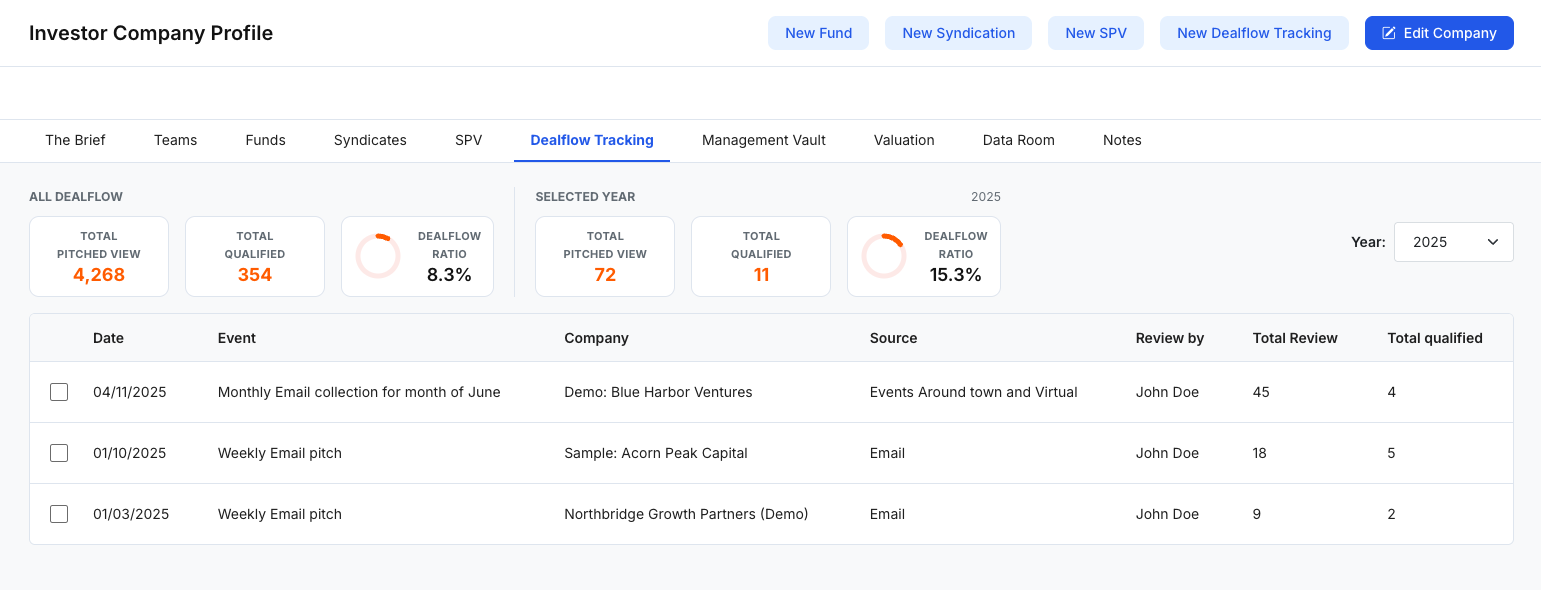
Dealflow Tracking helps investor teams measure and monitor deal sourcing activity over time—capturing events/sources, who reviewed them, how many deals were reviewed, and how many became qualified. It provides quick visibility into volume and conversion rates, both overall and by year.
What Dealflow Tracking is used for
Use Dealflow Tracking to:
- Log sourcing activity (events, email pitches, partner referrals, etc.)
- Track review volume (Total Review) and outcomes (Total Qualified)
- Monitor conversion with a Dealflow Ratio (qualification rate)
- Compare performance by year using the Year filter
- Keep a consistent internal record of sourcing effectiveness over time
Fields and metrics may vary depending on your organization’s configuration and workflow definitions.
Dashboard layout (at a glance)
1) Summary metrics (top cards)
The top of the page typically includes two sections:
All Dealflow
- Total Pitched View
- Total Qualified
- Dealflow Ratio (overall qualification rate)
Selected Year
- Total Pitched View
- Total Qualified
- Dealflow Ratio (for the year currently selected)
This layout helps you compare overall activity vs. the current year’s performance at a glance.
2) Year filter (top right)
Use the Year dropdown to switch the dashboard and table to a specific year (e.g., 2025). The “Selected Year” metrics update accordingly.
3) Activity table (main list)
The table logs individual dealflow entries. Common columns include:
- Date
- Event (e.g., “Weekly Email pitch”, “Monthly Email collection”)
- Company
- Source (e.g., Email, Events, Referral)
- Review by (assigned reviewer)
- Total Review
- Total Qualified
- A checkbox per row for selection (if bulk actions are enabled)
Use this table to scan activity, validate inputs, and audit performance by source/event.
Create a new Dealflow Tracking entry
Click New Dealflow Tracking to open the creation modal.
In the New Dealflow Tracking modal, you may be asked to enter:
- Date
- Event
- Company
- Source
- Review By (select a reviewer)
- Total Review
- Total Qualified
Click Save to create the entry. After saving, it appears in the table and contributes to the dashboard totals/ratios.
Suggested workflow (simple)
- Create a new entry for each recurring sourcing activity (weekly pitch, monthly collection, event, etc.).
- Track Total Review and Total Qualified consistently to maintain accurate ratios.
- Use the Year filter to review trends and performance over time.
- Compare sources/events to identify what consistently generates qualified dealflow.
Notes
- If you don’t see the “New Dealflow Tracking” action or editing controls, it may be permission-based.
- Teams often define internal guidelines for what counts as “Pitched View”, “Review”, and “Qualified” to keep reporting consistent.