
Due Diligence
Due Diligence (DD) is a structured workspace used to evaluate a startup in a consistent, repeatable way. It combines a checklist-based review process with collaboration tools (notes, comments, files) and progress tracking—helping teams stay aligned and keep an auditable record of decisions.
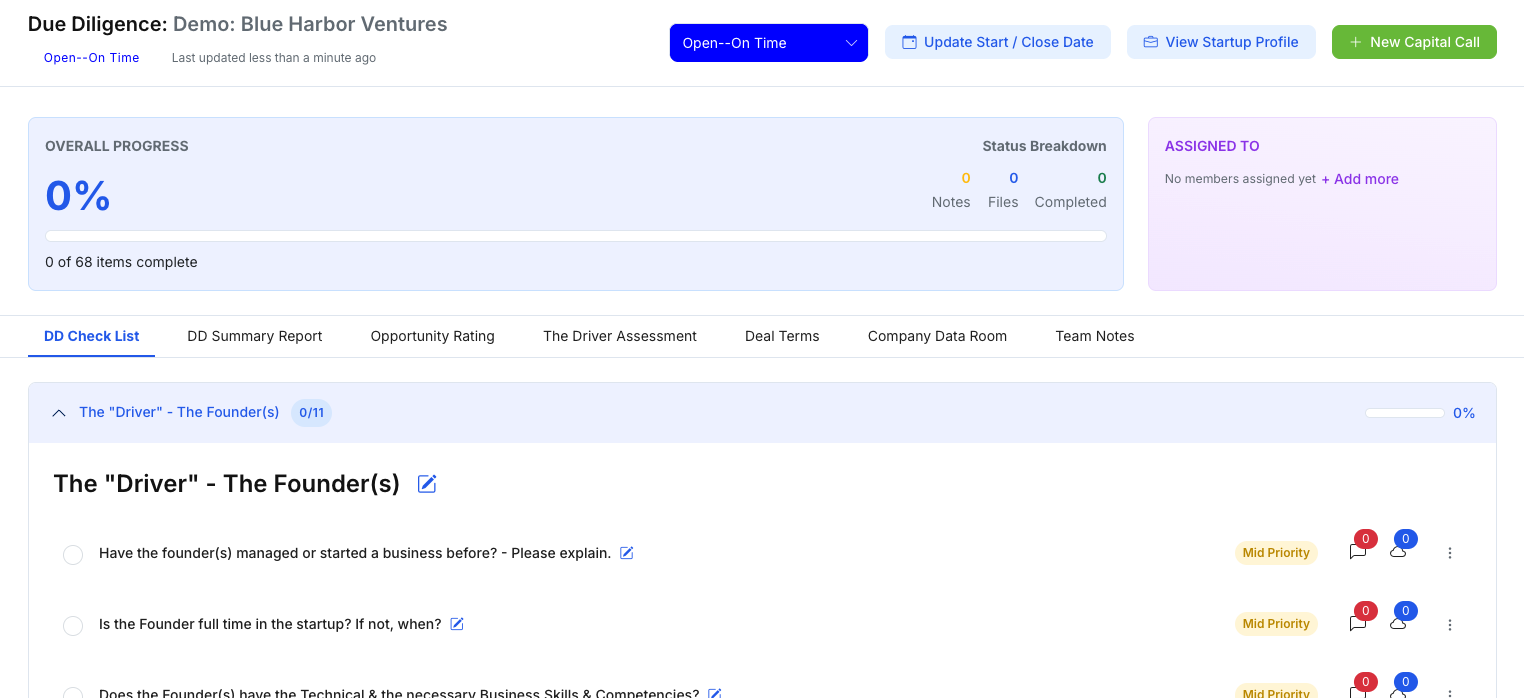
How Due Diligence starts
Due Diligence is typically created from Dealflow by selecting a startup and choosing Start DD Workout. A DD template defines the checklist structure, sections, and total tasks.
What you can do in Due Diligence
- Track progress using a structured checklist and completion indicators.
- Assign reviewers so multiple team members can collaborate.
- Document findings with section notes, comments, and uploaded files.
- Summarize outcomes using reporting and rating areas (when enabled).
- Take next steps such as creating a Capital Call (depending on permissions and workflow).
What you see and what you can do may vary based on your organization’s configuration, templates, and role permissions.
Page layout at a glance
1) Left navigation (DD status filters)
The left panel helps you quickly filter due diligences by status groups (counts may be shown), such as:
- Not Created, Created
- Open—On Time, Ready For Review, Open—Past Due
- Completed/Closed, On Hold, Canceled, Final Decision
These groupings help teams focus on what’s active, overdue, ready for review, or completed.
2) Header actions (top right)
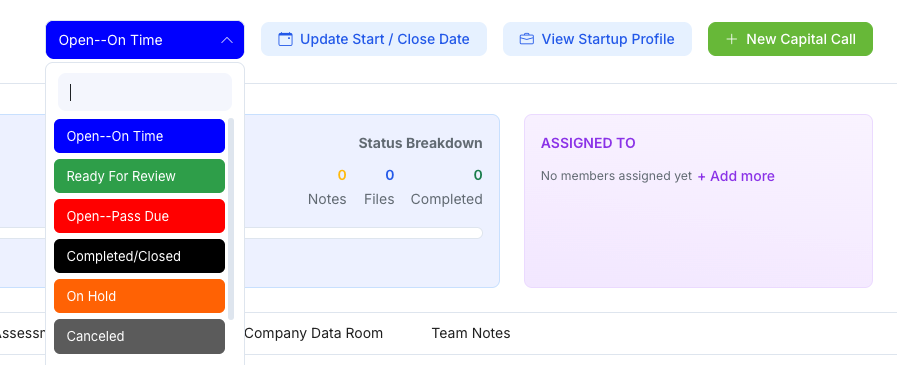
Depending on your permissions, you may see actions such as:
- Status dropdown (e.g., Open—On Time) to update the DD status
- Update Start / Close Date
- View Startup Profile
- + New Capital Call (creates a Capital Call from this DD when workflow allows)
3) Progress and assignment
- Overall Progress shows completion percentage and number of completed items.
- Status Breakdown may summarize counts of notes/files/completed items.
- Assigned To shows who is involved; use Add more to assign additional members.
Common Due Diligence tabs
Tabs can vary by organization, but common sections include:
- DD Check List: Task checklist grouped by sections; used for day-to-day review work.
- DD Summary Report: A structured place to write summaries per section and export/share outcomes.
- Opportunity Rating / Assessments: Areas for scoring or rubric-based evaluation (when enabled).
- Deal Terms: A place to capture deal-related information and final notes/conclusions.
- Company Data Room: Files relevant to diligence (pitch deck, documents, reports, etc.).
- Team Notes: Internal notes shared across the diligence team.
Suggested workflow (high level)
- Start in DD Check List to understand required work and assign owners.
- Capture findings through notes/comments and attach supporting files as you review.
- Use ratings/assessments and the summary report to consolidate conclusions (if available).
- Update status as the diligence progresses (on time → ready for review → closed).
- When decision-ready, create next steps such as a Capital Call (if your process supports it).
Notes
- Checklist content and total tasks depend on the selected Due Diligence template.
- Visibility of tabs and actions depends on your organization’s permissions and configuration.