
Manage Attendance
Attendance provides a read-only view of who is associated with events and their current attendance-related fields. Use this page to search, filter, and review attendance records, open attendee profiles, and (when enabled) view survey-based averages.
This page is view-only. You cannot edit attendance records from here.
Where to find Attendance
Go to Events → Attendance (or open Attendance from the Events sidebar, depending on your navigation).
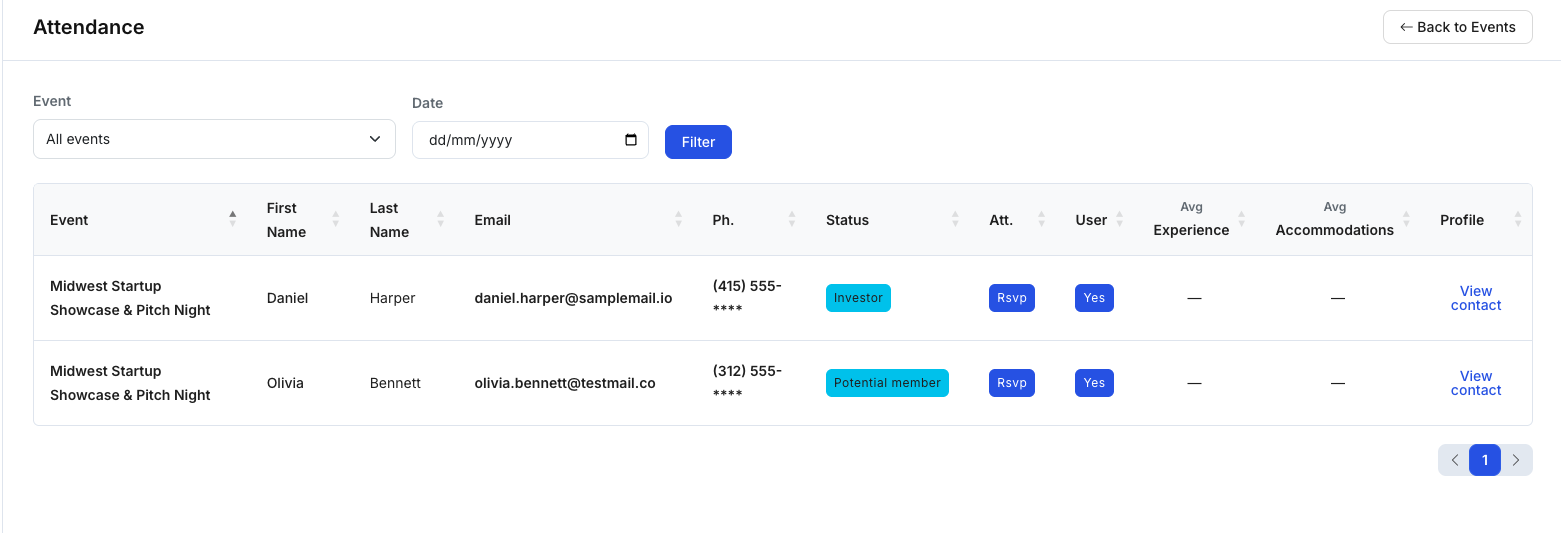
Filter attendance records
Use the filters at the top of the page to narrow results:
- Event: Select a specific event or keep All events
- Date: Filter records by date, then click Filter
Tip: Filter by a single event when reviewing results for a specific event.
Understand the attendance table
Common columns include:
- Event: The event associated with the record
- First Name / Last Name / Email / Phone: Attendee contact information
- Status: Contact classification/label (e.g., Investor, Potential member)
- Att.: Attendance state (e.g., RSVP, Attended), shown as recorded by the system/workflow
- User: Whether the contact has a login account (Yes/No)
- Avg Experience / Avg Accommodations: Survey-derived averages (shown when post-event survey + reporting is enabled)
- Profile: Opens the contact workspace (e.g., View contact)
Note: Column names and availability depend on organization configuration.
Open an attendee profile
Click View contact to open the contact workspace. From there you can:
- Review contact details
- Add internal notes (if enabled)
- Access contact-related areas such as Data Room / Portfolios (if enabled)
Tips
- Use this page as a quick reporting view (filter by event/date and scan outcomes).
- If survey average columns are blank, survey reporting may not be enabled or no responses exist yet.