
Management vault
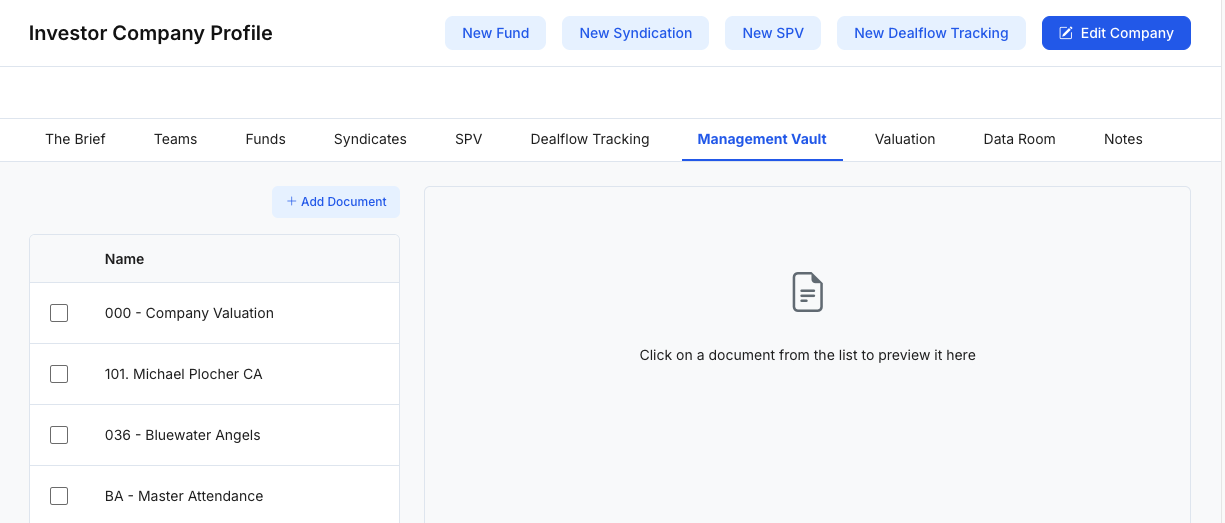
Management Vault is a curated document hub for an investor organization. It provides a lightweight way to store and access key operational resources (e.g., templates, internal playbooks, financial models, partner lists) by saving document links—often to tools like Google Drive/Docs/Sheets.
What Management Vault is used for
Use Management Vault to:
- Centralize operational resources (policies, templates, checklists, spreadsheets, playbooks)
- Organize documents in a simple list (quick scanning by name)
- Open and view resources in-place via an embedded viewer
- Reduce link sprawl across emails and chats by keeping a single source of truth
Visibility of documents and the ability to add/edit may vary based on role permissions.
Page layout (at a glance)
1) Document list (left panel)
The left panel shows a list of saved documents:
- Name (document title)
- A checkbox per row for bulk actions (if enabled)
- Pagination controls (e.g., Previous / Next)
Click a row to open the document in the viewer.
2) Embedded viewer (main/right panel)
Selecting a document loads it in an embedded viewer (commonly a Google Drive/Docs/Sheets embed or similar).
If you see a “You need access” message:
- The link points to a restricted document.
- You may need the owner to share it with your account (View/Comment/Edit), or you must sign into the correct Google account.
3) Add Document (top action)
- Add Document opens a modal to register a new resource.
Add New Document modal
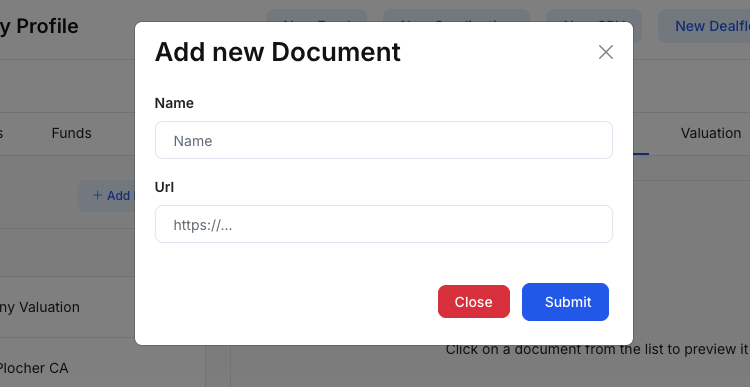
Figure 2 — Add a document link to the vaultThe Add new Document modal typically includes:
- Name: A human-friendly title used in the list.
- URL: The link to the document (e.g., Google Sheets, Google Docs, Drive file link, or any web-hosted resource).
Click Submit to save the document to the Management Vault list.
Suggested workflow (simple)
- Click Add Document.
- Enter a clear Name (recommend a consistent naming convention, e.g., “001 – Company Valuation”).
- Paste the URL to the resource.
- Click Submit and confirm it appears in the left list.
- Click the document to verify it loads correctly in the embedded viewer.
Notes
- If a document fails to load due to permissions, the Management Vault link is still saved—but users will only see the content once they have access on the source system (e.g., Google Drive sharing).
- For best results with Google docs, share with the intended team or a Google Group rather than individuals.